

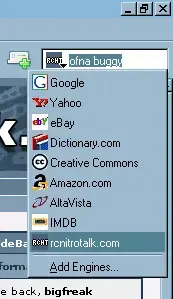
Calling myself a nerd is not only burtally honest, but doesn't quite give the situation justice. I downloaded firefox the other day and the little search jiggy in the upper right of the browser just captivated my attention. I MUST KNOW THE SECRECTS OF THE SEARCH JIGGY! Well I figured it out (not hard) and I used RCNT as my test subject.
I attached a zip file that you can unzip into: "C: \Program Files\Mozilla Firefox\searchplugins" This will create two files a RCNT.src file and an RCNT.png file. Next, you need to only close fire fox entirely and bring it back up to enjoy the RCNT search addon.
Now if you don't take candy from strangers and zip files are just too big of a security risk, this is how you do it:
You need to make two files, one is the RCNT.SRC file. Here's the code:
The next thing you need to make is a little icon for the search jigger. Open Painshop Pro, Photoshop or what ever tickles ya. You need to make a png or a gif that's 16x16. It seems that it only needs to have the same name as the SRC file. "blah.src" needs "blah.gif" or "blah.png". Now you have to put those files into this directory: C: \Program Files\Mozilla Firefox\searchplugins
Enjoy.
I think I'll go make one to search CDW. *snort snort*
I attached a zip file that you can unzip into: "C: \Program Files\Mozilla Firefox\searchplugins" This will create two files a RCNT.src file and an RCNT.png file. Next, you need to only close fire fox entirely and bring it back up to enjoy the RCNT search addon.
Now if you don't take candy from strangers and zip files are just too big of a security risk, this is how you do it:
You need to make two files, one is the RCNT.SRC file. Here's the code:
Code:
# Original source by bigfreak (find me at RCNT)
# Last updated: 26 Jan, 2005
#

<SEARCH
   version = "7.1"
   name = "rcnitrotalk.com"
   description = "RC Nitro Talk Search"
   method = "GET"
   action = "https://www.rcnitrotalk.com/forum/search.php"
   searchForm = "https://www.rcnitrotalk.com/"
>

<input name="query" user>
<input name="do" value="process">
<input name="showposts" value="0">

</SEARCH>
The next thing you need to make is a little icon for the search jigger. Open Painshop Pro, Photoshop or what ever tickles ya. You need to make a png or a gif that's 16x16. It seems that it only needs to have the same name as the SRC file. "blah.src" needs "blah.gif" or "blah.png". Now you have to put those files into this directory: C: \Program Files\Mozilla Firefox\searchplugins
Enjoy.
I think I'll go make one to search CDW. *snort snort*
Attachments
Last edited:


