• Welcome to RCTalk! 🚀

    Join the #1 RC community where hobbyists connect, share, and get expert advice on RC cars, trucks, boats, drones, and more!

    • Friendly & passionate RC enthusiasts
    • RC tips & troubleshooting
    • Buy, sell & trade RC gear
    • Share builds & upgrades

RCNT Search Box Plug-in for Foxfire

This site may earn a commission from merchant affiliate
links, including eBay, Amazon, and others.
awesome.. THANKS.

Now a code dumbie question.

I went to make another one for a diff site. and All it does is brings me to the search page. It doesn't perform a search at all.

What would I be doing wrong? I copied your Code and just changed the url stuff around.
 
I'll gladly help. We can post it in this thread so other folks can learn too...

OK, lets do an example. We'll do pricewatch.com and compare it to RCNT.

Here are the search URLs for each site:

Code:
RCNT Search URL
"https://www.rcnitrotalk.com/forum/search.php?query=nitro+fuel&do=process&showposts=0"

Pricewatch Search URL
"http://castle.pricewatch.com/s/search.asp?s=motherboard+memory"

(ignore the quotes in both URLS.  I had to do that so the board didn't put "..." in the URLs)

This would be the price watch code:

Code:
<SEARCH
   version = "7.1"
   name = "pricewatch.com"
   description = "Price Watch Search"
   method = "GET"
   action = "http://castle.pricewatch.com/s/search.asp"
   searchForm = "http://www.pricewatch.com/"
>

<input name="s" user>

</SEARCH>


The main difference is name of the search varible each site uses. For price watch I put in motherboard memory and you it in the URL next to "s=". Therefore, "s" is the search varible for pricewatch. If you look at the RCNT URL and try to locate "nitro fuel", you'll find it next to "query=". This is the varible RCNT uses to search the forums. so...

RCNT:
<input name="query" user>

Pricewatch
<input name="s" user>

Now, wtf are the extra dodas on the RCNT file??

<input name="do" value="process">
<input name="showposts" value="0">

If you look at the RCNT url, it's not as simple as the Price Watch URL. There are these two varibles that RCNT requires: do and showposts. So in order to make the RCNT search work, firefox needs these two lines to ensure it submits those two extra varibles.

 
First of all, a big thanks goes out to bigfreak for writing the RCNT search and for the tutorial.

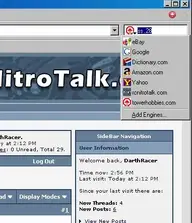
I had to prove I am a geek also, so I wrote one for Tower Hobbies Search!!!
Extract to the same folder you did the RCNT one, /Program Files/Mozilla Firefox/searchplugins and restart FireFox.

BTW, RCNT needs a downloads page for all this cool stuff!!!
 

Attachments

  • TowerSearchFireFoxPlugin.zip
    TowerSearchFireFoxPlugin.zip
    804 bytes · Views: 73
  • TowerSearchScreenie.webp
    TowerSearchScreenie.webp
    20.2 KB · Views: 79
Last edited:
sweet!! that's an awsome one!! I just installed it. :) I didn't actually finish the pricewatch.com one. I was too lazy to make an icon for it. I don't go there anymore. Venders who post products there are too shifty.

Horizon hobby would be cool, but their search bites. If you know the horizon part number, it works but I've had bad luck figuring out their part numbering system. horizon is probably more useful for dealers who have books with that stuff in it.
 
Funny, I'm actually working on a Horizon one now. Yeah, how they sort products blows but I still search their site for stuff they distribute.

The Horizon Hobby search is done!!!
 

Attachments

Their the only ones that stock dynamite engines and losi products though...

Thanks! I'll use that one too.

If you go to mozilla.org you can find the ones that already exist... tower already has one...

Good work though!
 
I tried to download firefox and it gave me a unspecified error
 
awesome THANKS for the info. I'm off to work right now so I'll have to mess wiht it in the AM.

I figured it was one of the veriables.
 
There are some great plug ins available for FireFox.
My favorite are.
RCNT Search :)
Developers tool bar.
Whether.
Spell checker.
Band width tester.

What do you guys like?
 
Got this from another forum... haven't restarted firfox yet though, so I don't know how effective it is. I don't want to loose my "new threads" tab.

Making Mozilla's Firefox "FASTER"
Here's something for broadband people that will really speed Firefox up:

1. Type "about:config" into the address bar and hit return. Scroll down and look for the following entries:

network.http.pipelining
network.http.proxy.pipelining
network.http.pipelining.maxrequests

Normally the browser will make one request to a web page at a time. When you enable pipelining it will make several at once, which really speeds up page loading.

2. Alter the entries as follows:

Set "network.http.pipelining" to "true"

Set "network.http.proxy.pipelining" to "true"

Set "network.http.pipelining.maxrequests" to some number like 30. This means it will make 30 requests at once.

3. Lastly right-click anywhere and select New-> Integer. Name it "nglayout.initialpaint.delay" and set its value to "0". This value is the amount of time the browser waits before it acts on information it recieves.

If you're using a broadband connection you'll load pages 2-3 times faster now.
 
olds97_lss said:
Got this from another forum... haven't restarted firfox yet though, so I don't know how effective it is. I don't want to loose my "new threads" tab.

Making Mozilla's Firefox "FASTER"
Here's something for broadband people that will really speed Firefox up:

1. Type "about:config" into the address bar and hit return. Scroll down and look for the following entries:

network.http.pipelining
network.http.proxy.pipelining
network.http.pipelining.maxrequests

Normally the browser will make one request to a web page at a time. When you enable pipelining it will make several at once, which really speeds up page loading.

2. Alter the entries as follows:

Set "network.http.pipelining" to "true"

Set "network.http.proxy.pipelining" to "true"

Set "network.http.pipelining.maxrequests" to some number like 30. This means it will make 30 requests at once.

3. Lastly right-click anywhere and select New-> Integer. Name it "nglayout.initialpaint.delay" and set its value to "0". This value is the amount of time the browser waits before it acts on information it recieves.

If you're using a broadband connection you'll load pages 2-3 times faster now.


DUUUUUDE that tip was so AWESOME!!! Everyone should try it!!!
 
This is a killer tip thanks for posting it. I really really really want to see what the difference is but I need to close down firefox and that means closing down my company Inventory Project and I have my windows just so. :( Oh well, I'll it shut down eventually.

EDIT: closed firefox and brought it back up. This is insane!! RCNT still suffers from lack of CPU (why it's slow), but MSN, ebay and even netscape.com are noticeably faster.
 
Last edited:
Back
Top