Darrent15
RCTalk Rookie
- Messages
- 16
- Reaction score
- 18
- Points
- 43
So your hiking out in the woods and you come along a nice trail. You take out your crawler and begin your epic run on the trail. But wait, how are you going to capture the trail run without a free hand to record. You have several choices.
#1. Ask your buddy who came along with you to record but he just doesn't seem to get the right angle.
#2. You control your crawler with one hand and use the other to record, but the the crawler gets out of control and it tips over or crashes.
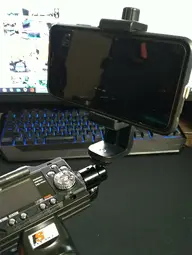
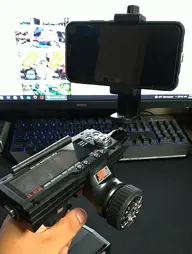
#3. Modify your transmitter with a camera mount which allows you full control of the crawler and get the perfect video.
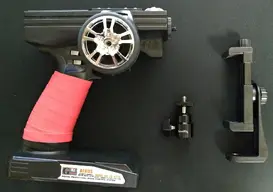
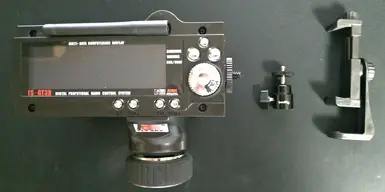
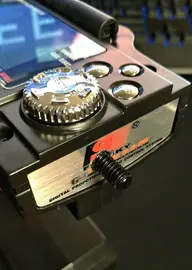
Well, in this scenario I choose option 3. After looking all over the internet to find a solution and looking at several mods of people and their radios, I just didnt like what I saw. So I went on amazon and decided to order a few things, all within $30. Here is what I came up with. Enjoy.
****Forgot to take pictures of taking the top cover off the radio and then drilling a hole to mount the camera hot shoe mount.****
Camera Hot Shoe Mount
https://www.amazon.com/gp/product/B0062TVHBE/ref=ppx_yo_dt_b_asin_title_o02_s00?ie=UTF8&psc=1
Phone Tripod Mount
https://www.amazon.com/gp/product/B01MU2U5HT/ref=ppx_yo_dt_b_search_asin_title?ie=UTF8&psc=1
#1. Ask your buddy who came along with you to record but he just doesn't seem to get the right angle.
#2. You control your crawler with one hand and use the other to record, but the the crawler gets out of control and it tips over or crashes.
#3. Modify your transmitter with a camera mount which allows you full control of the crawler and get the perfect video.
Well, in this scenario I choose option 3. After looking all over the internet to find a solution and looking at several mods of people and their radios, I just didnt like what I saw. So I went on amazon and decided to order a few things, all within $30. Here is what I came up with. Enjoy.
****Forgot to take pictures of taking the top cover off the radio and then drilling a hole to mount the camera hot shoe mount.****
Camera Hot Shoe Mount
https://www.amazon.com/gp/product/B0062TVHBE/ref=ppx_yo_dt_b_asin_title_o02_s00?ie=UTF8&psc=1
Phone Tripod Mount
https://www.amazon.com/gp/product/B01MU2U5HT/ref=ppx_yo_dt_b_search_asin_title?ie=UTF8&psc=1