• Welcome to RCTalk! 🚀

    Join the #1 RC community where hobbyists connect, share, and get expert advice on RC cars, trucks, boats, drones, and more!

    • Friendly & passionate RC enthusiasts
    • RC tips & troubleshooting
    • Buy, sell & trade RC gear
    • Share builds & upgrades

how to post pics

This site may earn a commission from merchant affiliate
links, including eBay, Amazon, and others.

spongebobspongebob

RCTalk Basher
Messages
44
Reaction score
0
Points
0
RC Driving Style
I was trying to post some pics today, but it said the max boundries were 480x480. My cam's lowest setting is 640x480, so how do I compress the pics to post them? I was wanting to show pics of my tc4 and the body I just finished. Any help would be greatly appreciated.
 
You can resize your photos for sending via e-mail with most graphics programs. You can use MSPaint, included in Windows or you can download a free program such as Irfanview . In Irfanview, select the "Resize/Resample" option from the Image menu. In Paint, select the "Attributes" option from the Image menu. Choose the unit of measurement (inches, centimeters, or pixels) and type in lower numbers for the height and width of the picture.
 
spongebobspongebob said:
I just tried again, and it says it has to be 480x480
The picture limitation is 640 X 480 Check the properties of your picture.
 
Jon2

I just tried to upload an image that was over sized and got the following message.

"File Too Large. Limits are 480 x 480. Your file is 1000 x 750. "

could your member status allow you to upload smaller pics? We're just newbies. :shrug:
 
stallsmithb said:
Jon2

I just tried to upload an image that was over sized and got the following message.

"File Too Large. Limits are 480 x 480. Your file is 1000 x 750. "

could your member status allow you to upload smaller pics? We're just newbies. :shrug:
First off your file is too big regardless. ARe you trying to upload into the gallery? If you are and you aren't at that level of subscription then it won't allow you to. But the file limit is 640 X 480. I am checking the error message if it is incorrect
 
I know my file was too large, that was how I was testing the file size message. I was adding it to a post in this thread
 
stallsmithb said:
I know my file was too large, that was how I was testing the file size message. I was adding it to a post in this thread


Hmmm Well I am checking in to it with the staff and will help you out as soon as I get an answer!!
 
FastEddy said:
The size limit for photos IN a thread is 640 x 480.
Post Attachments are limited 480 x 480.
Thank you for clearing that up.
 
I believe the attachment size has now been raised to 640 x 480
If someone wants to give it a try and let me know that would be great.
 
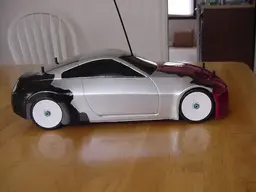
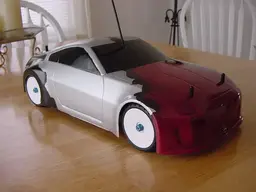
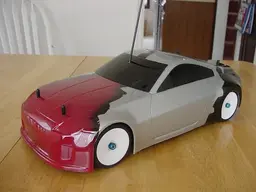
Sweet, I got my 640x480 pics uploaded. Thanks for the help. These are the pics of my tc4. I originally took these pics about 2 weeks ago. The body has some racing scars now :arrr:

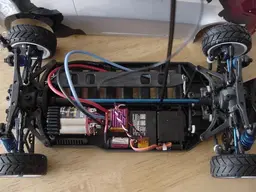
Here's a pic of the tc4 with the lid off. I have a deans plug on it now and the motor wired. I'm running a trinity street spec motor, and spec batteries.
 

Attachments

  • dec29 011.webp
    dec29 011.webp
    15.1 KB · Views: 131
  • dec29 012.webp
    dec29 012.webp
    17 KB · Views: 131
  • dec29 013.webp
    dec29 013.webp
    20.3 KB · Views: 145
  • dec29 010.webp
    dec29 010.webp
    35.3 KB · Views: 136
greenwing7 said:
https://www.rcnitrotalk.com/forum/showthread.php?t=26904&highlight=smartech this is the forum that I posted them in is that what you were wanting a link to??

Thanks for the link.
There are two different ways to post photos, A hosted photo like the one you linked to and an attached photo like the ones Spongebob has attached in the post above.

The forum rules will let you POST a photo up to 640x480. We had the ATTACHMENT limit set lower. We have now increased the size limitation of an attachment to 640x480.
 
Back
Top